

Step 2: Receiving assets
Whitelisted vault required
If you have not followed Step 1 - Whitelist your vault, all transactions sent to your vault will fail.
1. Getting your vault ID
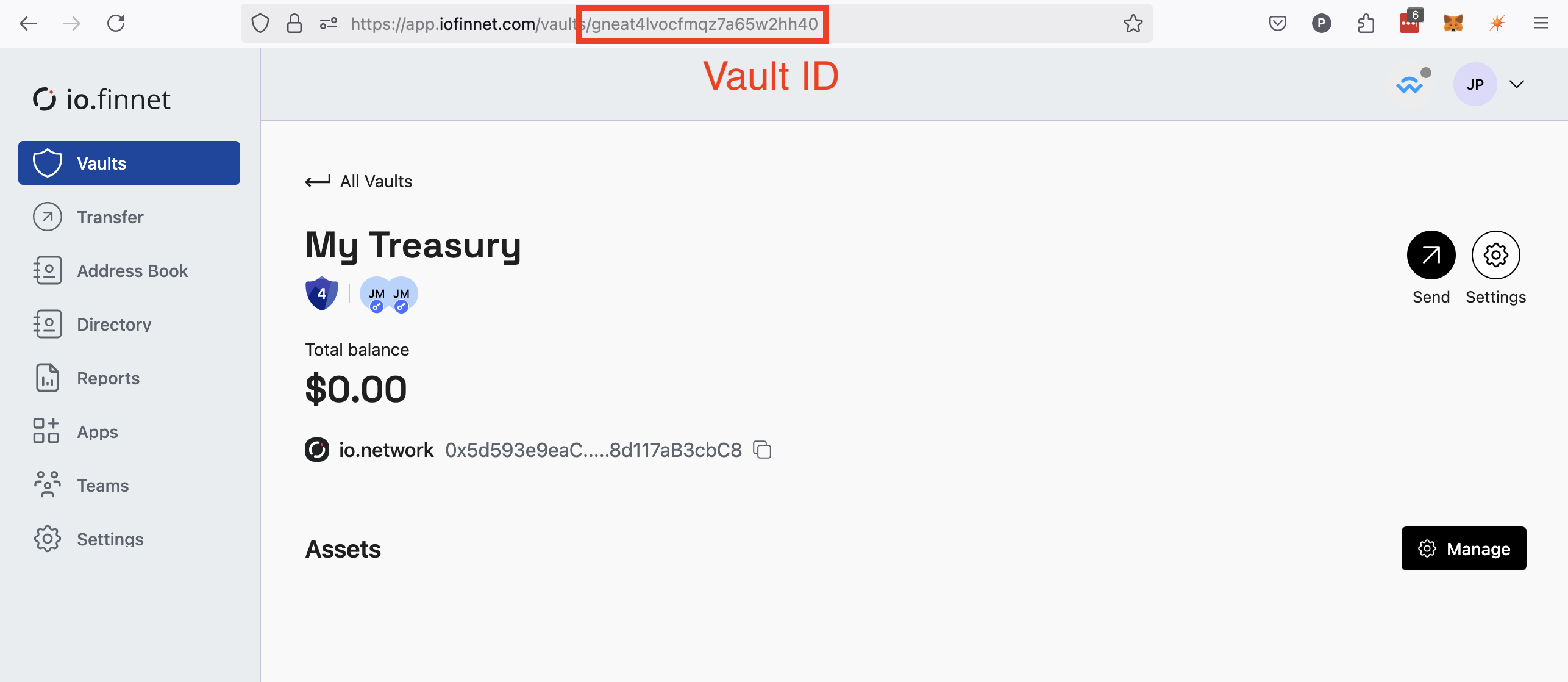
Before you can query the API for inbound and outbound transactions, you need the vault ID. You can find it in the dashboard URL or by calling the /v1/vaults endpoint.
Navigate to your vault in the dashboard. The vault ID is the suffix of the URL:
2. Viewing incoming and outgoing transactions
Use the /v1/vaults/{vaultId}/network/statement endpoint to retrieve a statement of all inbound and outbound transactions.
const res = await fetch(`https://api.iofinnet.com/v1/vaults/${vaultId}/network/statement`, {
  method: 'GET',
  headers: {
    'Authorization': `Bearer ${accessToken}`,
    'Content-Type': 'application/json'
  }
});
const resJson = await res.json();
return resJson.data.map(tx => ({
  id: tx.id,
  status: tx.status,
  transactionHash: tx.transactionHash,
  amount: tx.amount,
  type: tx.type,
  sendingAddress: tx.sendingAddress,
  createdAt: tx.createdAt
}));
Public blockchains
For public blockchain transactions such as Bitcoin or Ethereum, use
/v1/vaults/{vaultId}/assets/{assetId}/transactionsinstead.
3. Verifying the remitter
When integrating with io.network, you will likely want to verify the identity of the entity sending funds to your vault. Query the io.network directory endpoint /v1/network/directory/address/{address} to look up vetted contacts managed by your principal member.
const getRemitter = async (senderAddress) => {
  const res = await fetch(`https://api.iofinnet.com/v1/network/directory/address/${senderAddress}`, {
    method: 'GET',
    headers: {
      'Authorization': `Bearer ${accessToken}`,
      'Content-Type': 'application/json'
    }
  });
  const resJson = await res.json();
  return {
    id: resJson.data.id,
    address: resJson.data.address,
    alias: resJson.data.alias,
    type: resJson.data.type,
    displayName: resJson.data.displayName,
    companyName: resJson.data.companyName,
    legalName: resJson.data.legalName
  };
};
4. Putting it all together
The script below lists recent transactions for your vault and looks up each party in the io.network directory. Replace the vaultId variable with your own, and set accessToken to a token obtained from the auth flow in step 1.
import fetch from 'node-fetch';

const getNetworkStatement = async (vaultId, accessToken) => {
  const response = await fetch(`https://api.iofinnet.com/v1/vaults/${vaultId}/network/statement`, {
    method: 'GET',
    headers: {
      Authorization: `Bearer ${accessToken}`,
      'Content-Type': 'application/json',
    },
  });
  const resJson = await response.json();
  return resJson.data;
};

const getDirectoryIdentity = async (networkAddress, accessToken) => {
  const response = await fetch(`https://api.iofinnet.com/v1/network/directory/address/${networkAddress}`, {
    method: 'GET',
    headers: {
      Authorization: `Bearer ${accessToken}`,
      'Content-Type': 'application/json',
    },
  });
  const resJson = await response.json();
  return resJson.data;
};

const processIncomingTransactions = async () => {
  const accessToken = '<your_access_token>'; // Token from step 1
  const vaultId = '<your_vault_id>';

  console.log(`Fetching transactions for vault ${vaultId}...`);
  const transactions = await getNetworkStatement(vaultId, accessToken);

  for (const tx of transactions) {
    const remitter = await getDirectoryIdentity(tx.sendingAddress, accessToken);
    const beneficiary = await getDirectoryIdentity(tx.receivingAddress, accessToken);
    console.log(`Transaction Amount: ${tx.amount} ${tx.asset.name} From: ${remitter.displayName} To: ${beneficiary.displayName}`);
  }
};

processIncomingTransactions().catch(console.error);
Terminal output:
Fetching transactions for vault zf5tmfhfu16nadvgui9fivxz...
Transaction Amount: 10.0002 (Test USD) From: John Snow Ltd. To: Iofinnet
Transaction Amount: 5.23 (Test USD) From: Iofinnet To: John Snow Ltd.
Updated about 2 months ago